

Sources checked · By VFIX Communications
Your office loses internet access. A client is calling the main number. Does the call reach someone, go to a monitored mailbox, or keep ringing where nobody can answer?
For a Bay Area law firm, accounting practice, or consulting office, that question deserves an answer before an outage. Start with one agreed destination for incoming calls, one person responsible for activating the plan, and a backup person who can step in.
The right route depends on your phone service and the failure itself. An office internet outage, a power failure, and a phone-provider outage need separate consideration.
Configure the route before you need it
Ask your carrier or phone provider whether your plan supports provider-side forwarding, forwarding when an office phone becomes unreachable, or another outage-routing option. Find out whether it activates automatically or requires someone to change a setting. Configure supported rules in the provider's portal ahead of time, rather than relying on a desk phone you may not be able to use.
Check which numbers the rule covers. A direct extension, the main office number, a menu option, and a shared call queue may behave differently. For example, Nextiva's forwarding documentation says its user-level forwarding settings apply to direct calls, not distributed call-center or call-group calls. That is a provider-specific example, not a description of VFIX service.
Have an authorized administrator confirm the actual route for your account. Keep the provider's support contact, portal address, and escalation instructions available outside the office network. Do not put passwords in the outage checklist.
Choose a destination someone will actually answer
An alternate route needs an owner, hours of coverage, and a plan for unanswered calls. Consider:
- A designated mobile number, with the recipient's agreement and clear expectations about business calls.
- Another staffed office or approved answering service, if your service supports that destination.
- A business voicemail box that a named person can access and check during the disruption.
A mobile app and forwarding to a mobile number are different options. Ask which your service supports, how each connects, and whether calls still depend on the affected provider. Test the intended mobile route away from the office Wi-Fi. A charged handset is useful only when the required service and network are available.
For client-facing teams, also decide what happens to confidential messages and callbacks. Use approved devices and accounts, and keep client details out of improvised personal notes.
Give the plan a simple call path
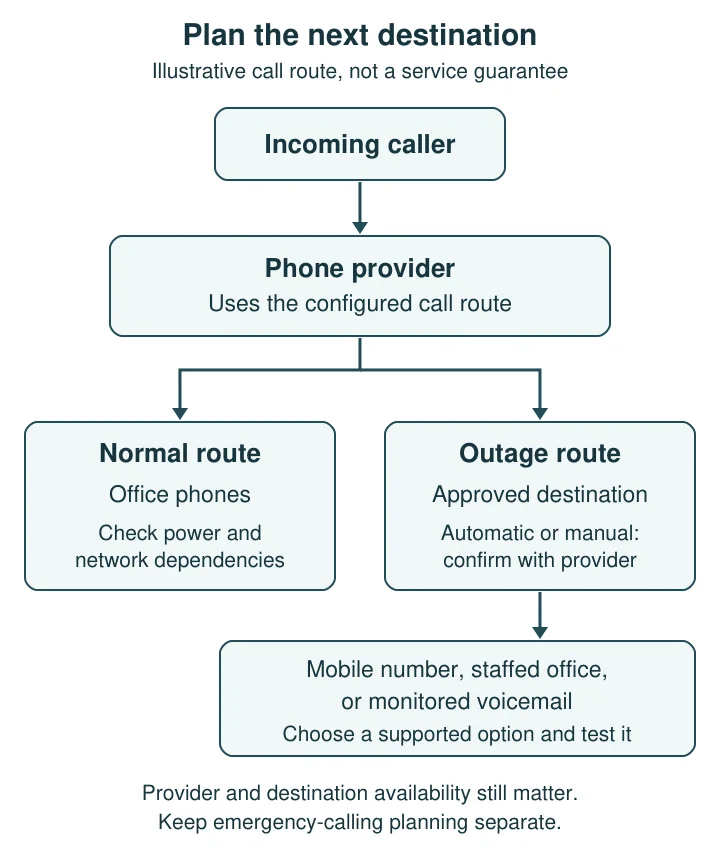
Open the full-size routing diagram
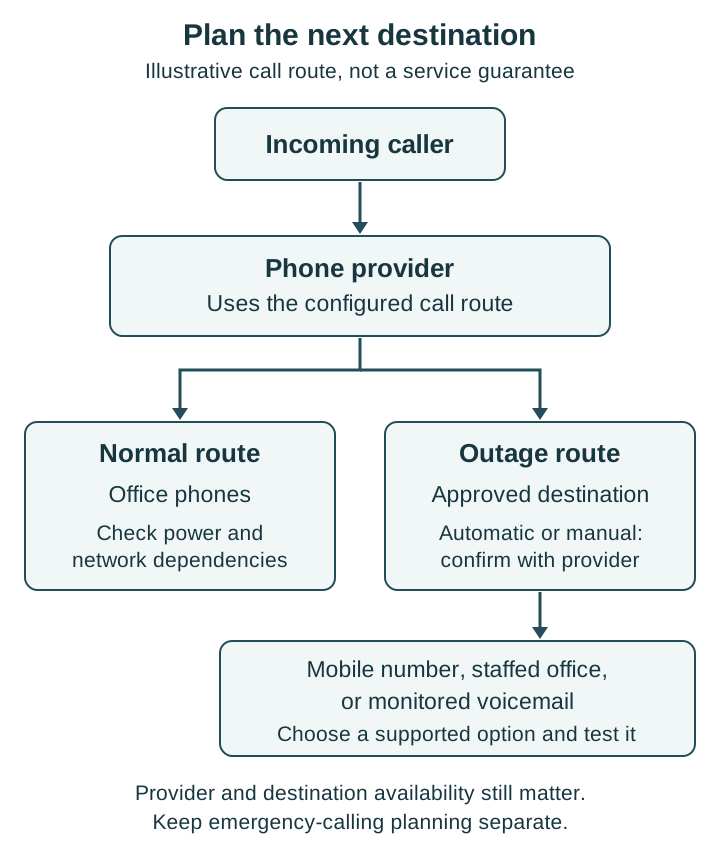
Test incoming and outgoing calls separately
Schedule a controlled exercise with your IT and phone providers. Tell staff when it will happen and agree on how to restore normal service. Do not unplug shared equipment during client work to discover what breaks.
Use this checklist:
- Call the published main number from an outside phone. Check the greeting, menu choices, transfer path, and final destination.
- Test direct numbers and shared queues separately. Check business hours, after-hours handling, and what happens when the alternate recipient does not answer.
- Simulate loss of office internet access using an agreed test method. Confirm who activates a manual route and how they reach the portal.
- Review power loss separately. Identify the phones, modem, router, switches, and other equipment the planned route needs. Ask what backup power actually supports and for how long.
- Place ordinary outbound calls through the fallback method. Check audio, the number the recipient sees, and where return calls arrive. A successful incoming call does not prove this part works.
- Restore the normal route and retest it. Record the result, any missed calls or messages, and the person responsible for fixing each gap.
Repeat the exercise after meaningful changes to numbers, staff, routing, or equipment.
Keep emergency calling separate
Do not treat this checklist as an emergency-calling guarantee. FCC rules for interconnected VoIP identify broadband failure and electrical power loss among circumstances that can limit or interrupt E911 service.
Review your provider's emergency-calling instructions and required location information. Make sure staff know the office address and the limitations of the devices they may use. Do not dial 911 as part of an ordinary routing test. 911.gov advises scheduling any 911 test call through the local center's non-emergency number.
Make one decision this week
Choose the destination for your main number during an office outage, then ask your provider to confirm and test it. Explore VFIX's cloud phone service and talk with VFIX about your current setup, the options available, and the service scope your office needs.